Have you ever pushed a code update on a Friday afternoon, only to discover too late that an unexecuted test suite broke production while you were away?
In modern software engineering, manual testing, compilation, and script execution are no longer just tedious—they are significant operational liabilities. Continuous Integration and Continuous Delivery (CI/CD) pipelines serve as the automated backbone of modern software engineering, turning raw source code commits into tested, packaged, and deployed releases automatically.
In this lesson, you will learn to:
- Deconstruct pipeline architecture by mastering the core hierarchy of pipelines, stages, jobs, and steps.
- Compare leading CI/CD platforms—Azure Pipelines, GitHub Actions, and Jenkins—by analyzing their syntax, execution models, and governance capabilities.
- Optimize build performance using advanced automation mechanisms such as dependency caching, matrix strategies, and artifact passing.
- Enforce enterprise-grade security and governance using release gates, OIDC passwordless authentication, and comprehensive pipeline infrastructure backups.
Building Blocks and Mechanics of Azure Pipelines
To understand how automated delivery works, think of a CI/CD pipeline as an automated gourmet kitchen. Raw code enters as ingredients, passes through specialized prep stations, undergoes rigorous taste testing, and is ultimately served to restaurant patrons. In Azure DevOps, this assembly process follows a strict execution hierarchy: Pipelines → Stages → Jobs → Steps.
At the top level sits the Pipeline, defined in a root configuration file named azure-pipelines.yml. The pipeline divides execution into Stages, which represent major logical phases such as Build, Integration Test, and Deploy to Production. Each stage contains one or more Jobs that execute on designated compute nodes called Agents. Finally, each job executes a sequential list of Steps—either platform tasks (like NodeTool@0) or raw shell scripts (like npm install or npm run build).
Ephemeral Agents and Clean Execution Azure Pipelines utilizes an ephemeral execution model. When a build is triggered—via a repository push or pull request—a fresh virtual machine (a Microsoft-hosted agent running Ubuntu, Windows, or macOS) spins up in seconds, executes the requested job in isolated environment boundaries, and vanishes immediately after. This prevents dirty workspace pollution where leftover dependencies corrupt future builds.
Optimizing Pipeline Velocity: Caching and Matrix Builds Because ephemeral runners start with clean workspaces, downloading software dependencies on every run can create severe build bottlenecks. For instance, a Node.js build downloading packages on every run might take 45 seconds. By introducing a caching action that saves and restores the node_modules folder using a hash key of package-lock.json, subsequent build durations can drop to just 8 seconds.
To ensure software compatibility across multiple environments, pipelines utilize matrix build strategies. Rather than writing separate build files for every target environment, a matrix strategy instructs the agent pool to spawn parallel jobs simultaneously. A single pipeline file can execute six parallel jobs testing Node.js versions 18, 20, and 22 across both ubuntu-latest and windows-latest operating systems, providing rapid feedback before code reaches the mainline branch.
Build Once, Deploy Everywhere Another core rule of CI/CD pipeline design is publishing pipeline artifacts. A build job compiles code once and packages output files into a named artifact (such as an app zip file). Downstream release stages download this exact verified package for deployment to Staging and Production, eliminating the risky practice of re-compiling code between environments.
Generating Slide Deck…
Anatomy of an Azure Pipeline
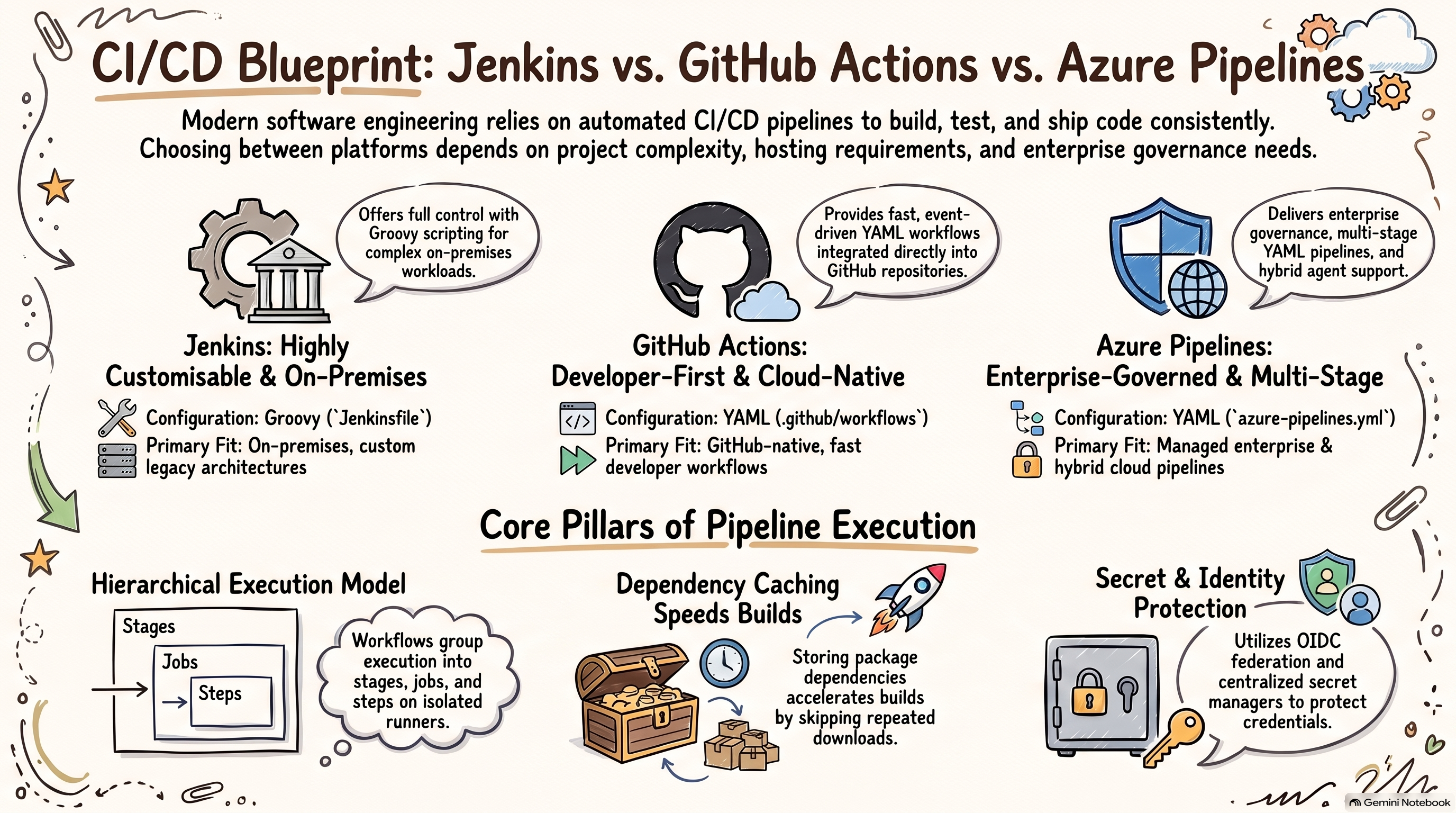
Comparative CI/CD Architectures: Azure Pipelines, GitHub Actions, and Jenkins
While modern CI/CD engines strive toward the same goal—automating software delivery—their architectural paradigms, reusability models, and operational philosophies differ significantly.
Azure Pipelines: Enterprise-Grade Governance and Governance Isolation Originating from Team Foundation Server (TFS), Azure Pipelines is designed for complex, highly regulated enterprise environments. It enforces a rigid Pipelines → Stages → Jobs → Steps structure, creating clean separation between Continuous Integration (building) and Continuous Delivery (release environments). Reusability is driven by a powerful YAML Template framework implementing the extends pattern. Platform teams publish standard template chassis that application teams extend, ensuring compliance and security scans cannot be bypassed. Secrets and configurations are centrally governed via Variable Groups integrated directly with Azure Key Vault.
GitHub Actions: Event-Driven, Developer-First Automation Launched in 2019, GitHub Actions centers around an event-driven model built directly into GitHub code repositories. Workflows trigger natively on granular repository events—such as pull request reviews, branch pushes, issue comments, or incoming webhooks. Its syntax follows a flat Workflows → Jobs → Steps model. Reusability is powered by Composite Actions (grouping steps) and Reusable Workflows (calling workflow files), complemented by the massive ecosystem of the GitHub Marketplace. Cloud authentication relies on keyless OpenID Connect (OIDC) short-lived tokens, eliminating static credentials stored in code repositories.
Jenkins: The Veteran Open-Source Workhorse Jenkins represents the classical server-based automation paradigm. It relies on a stateful Controller-Agent architecture where agents often run as long-lived virtual machines or bare-metal servers. Pipelines are written using a procedural or declarative Groovy DSL stored in a Jenkinsfile. Jenkins boasts a ecosystem of over 1,800 community plugins, making it capable of interfacing with legacy systems, air-gapped networks, and obscure version control tools. However, Jenkins requires substantial operational overhead: engineering teams must manually provision compute, patch Java vulnerabilities, maintain plugins, and prevent dirty workspace accumulation.
Evaluating Platform Trade-Offs
- Hosting Model: Azure Pipelines and GitHub Actions offer fully managed, auto-scaling hosted runners alongside self-hosted capabilities. Jenkins is strictly self-hosted, putting infrastructure maintenance entirely on internal teams.
- Pipeline Syntax: Azure Pipelines and GitHub Actions rely on declarative YAML configuration files. Jenkins relies on Groovy scripting.
- SCM Flexibility: GitHub Actions works exclusively with GitHub repositories. In contrast, both Azure Pipelines and Jenkins can connect to Git, Bitbucket, GitLab, Subversion, and third-party repositories.
CI/CD Platform Architectural Matrix
Enterprise Governance, Security, and Pipeline Protection
As software delivery scales across enterprise teams, pipeline security transitions from simple password masking to strict environment governance, identity federation, and platform resiliency.
Decoupling Governance via Azure DevOps Environments In production pipelines, security policies should never depend on individual developers writing correct script logic. Azure Pipelines decouples deployment policy from repository code through Deployment Environments.
When a multi-stage YAML pipeline references a target environment (e.g., environment: 'Production'), the build automatically pauses execution and inherits all governance policies attached to that environment in the portal:
- Human Oversight (Approval Workflows): Mandatory sign-offs require designated reviewers (such as QA leads or security officers) to approve deployments before stage execution begins.
- Automated Safety (Release Gates): Gates query external Application Performance Monitoring (APM) tools or REST APIs to verify system health. If post-deployment error rates breach defined thresholds during an evaluation window, the pipeline halts or triggers an automated rollback.
- Deployment Windows: Controls can restrict production deployments to specific business hours or scheduled maintenance slots.
Passwordless Authentication via Workload Identity Federation (OIDC) Storing long-lived cloud management passwords or access keys in pipeline variables creates critical security risks. Modern CI/CD platforms leverage OpenID Connect (OIDC) and Workload Identity Federation. When a pipeline runs, the agent requests a short-lived, cryptographically signed JSON Web Token (JWT) from the pipeline issuer. The cloud provider (Azure, AWS, or GCP) verifies this token and grants temporary, scoped permissions. No static cloud passwords or secrets ever exist in variable groups or runner memory.
The Critical Oversight: Safeguarding Pipeline Infrastructure While application teams store azure-pipelines.yml files directly in Git repositories, relying on basic Git versioning for total disaster recovery leaves dangerous security blind spots.
The operational context surrounding a pipeline—agent pool allocations, service connections, environment permissions, Variable Group secrets, and release history—lives outside the Git repository plane inside the Azure DevOps management layer. Human error, malicious account tampering, or misconfigurations can wipe out this infrastructure context instantaneously. Automated backup solutions like GitProtect secure this entire backbone. By capturing automated, encrypted backups of source repositories, pipeline definitions, permission structures, metadata, and project wikis, teams ensure their infrastructure-as-code state remains reproducible and recoverable during unexpected disruptions.
Summary
Modern CI/CD pipelines form the foundation of agile software engineering, transforming raw code pushes into reliable, tested releases. By structuring workflows into multi-tier hierarchies, enforcing passwordless cloud authentication, leveraging environment release gates, and protecting pipeline management layers with automated backups, teams establish scalable, secure delivery pipelines.
Key Takeaways:
- Structured Execution Hierarchy: Azure Pipelines organizes execution through Pipelines, Stages, Jobs, and Steps to maintain clear boundaries between build verification and release orchestration.
- Performance Optimization: Implement ephemeral compute environments alongside dependency caching and matrix build strategies to minimize build durations and ensure multi-environment compatibility.
- Platform Differentiation: Choose GitHub Actions for event-driven, developer-centric workflows; Azure Pipelines for enterprise multi-stage governance and template control; and Jenkins for complex on-premises or air-gapped customization.
- Decoupled Governance: Use Azure DevOps Environments to attach manual approvals and automated telemetry release gates directly to target deployment infrastructure without altering application YAML code.
- Complete Supply Chain Defense: Combine keyless OIDC cloud authentication with comprehensive backups (using tools like GitProtect) to safeguard source code, YAML configurations, and metadata.